In Part 4 we wrote the description that decides whether a question should come to our gold warehouse at all. Now the question has arrived, and the agent has to write the T-SQL. All it has to go on is the schema you selected and the data source instructions you write.
Quick housekeeping first: from this post on, the gold layer lives in a warehouse called gold_dw instead of gold_wh. It's the same seven views over silver_wh, so every number from Parts 3 and 4 still holds. One setting did change, the collation, and it turns out to matter. We'll get to it in Question 5.
So I ran an experiment. I published an agent on gold_dw with zero data source instructions and asked it five questions, each aimed at a trap I'd found in the schema. Two answers came back empty. One was right, but only because the agent happened to guess the meaning I wanted. And my first attempt at fixing things broke an answer that had been correct.
The test setup: a new data agent, Contoso Sales Agent, with gold_dw as its only data source: all seven views selected, the data source description from Part 4, and no agent-level instructions, so nothing else could influence the answers. The "before" round ran in the agent's chat; the later rounds ran against the published agent. I checked every answer against the queries in this post.
Below is each question: what the agent did, why, and the exact instruction line that fixed it. By the end you'll have the full instructions, and you'll know where every line came from.
What goes in data source instructions
Microsoft splits the context for a SQL source into four places, and it helps to know which job belongs where:
- Schema selection: which views the agent may query at all.
- Schema object descriptions (preview runtime only): what one table or column means.
- Data source instructions: rules that span objects, like join paths, grain, default filters and valid values.
- Example queries: worked patterns for tricky questions (that's Part 8).
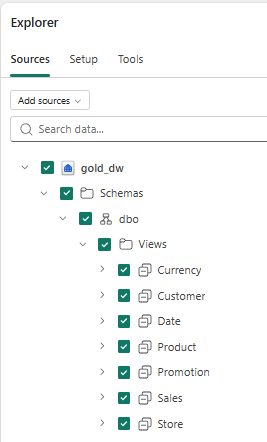
Schema selection is on the Sources tab of the Explorer. For this agent it's all seven views in gold_dw, with every column:
The other three sit under Setup, beneath each data source. Note that agent instructions sit one level up, because they apply to the whole agent, not one source:
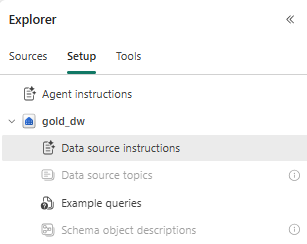
Data source topics and Schema object descriptions are greyed out here because they need the preview runtime. Everything in this post uses the plain Data source instructions field.
Microsoft's suggested template for the instructions has three sections: General knowledge, Table descriptions and When asked about. Every fix below lands in one of them.
Question 1: "What is the average unit price we charged for cameras?"
What it did: answered "returned no value" and asked me for the exact category name.
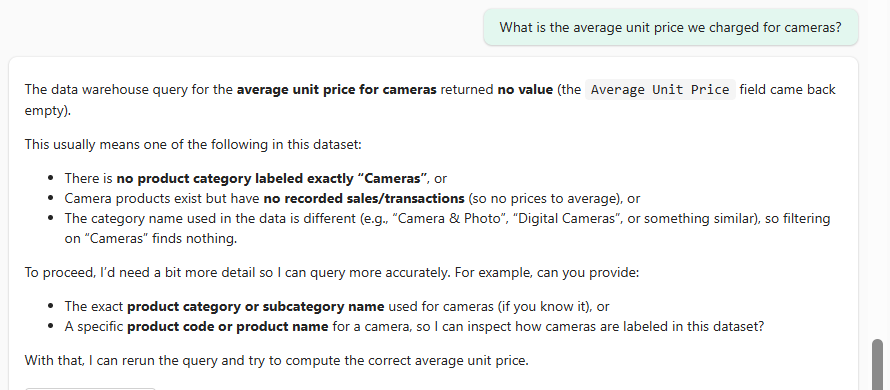
Why: here's the filter it wrote:
WHERE p.[Product Category] = 'Cameras'
The category is actually called Cameras and camcorders. The agent writes filters without looking at your data first, so it guesses literal values, and a wrong guess doesn't error. It just returns nothing.
Credit where it's due: the price logic was right. It divided [Sales Amount] by [Sales Quantity] instead of grabbing Product.[Unit Price], which would have been wrong, because that column holds list prices:
SELECT SUM(s.[Sales Amount]) / SUM(s.[Sales Quantity])                AS price_charged,
       SUM(s.[Sales Quantity] * p.[Unit Price]) / SUM(s.[Sales Quantity]) AS list_price
FROM dbo.Sales AS s
JOIN dbo.Product AS p ON p.Product_Key = s.Product_Key
WHERE p.[Product Category] = 'Cameras and camcorders';
| price_charged | list_price |
|---|---|
| 373.16 | 409.75 |
That's a 10% gap that would have looked perfectly plausible.
The lines I added:
- Product.[Product Category] values: 'Home Appliances', 'Computers', 'Cameras and camcorders',
  'Cell phones', 'TV and Video', 'Games and Toys', 'Audio', 'Music, Movies and Audio Books'.
- Revenue, cost, price: use dbo.Sales columns only. Never use Product.[Unit Price] or Product.[Unit Cost].
After: 373.16. Correct.
Question 2: "What were total sales for active products?"
What it did: "returned no value", and then it concluded the data has no notion of active products.
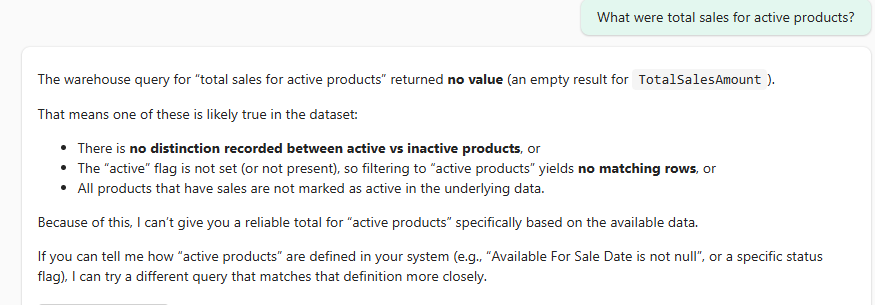
Why: it filtered on a value that doesn't exist:
WHERE P.[Status] = 'Active';
Here's what Product.[Status] really holds, and why it matters:
SELECT p.[Status], COUNT_BIG(*) AS order_lines, SUM(s.[Sales Amount]) AS sales_amount
FROM dbo.Sales AS s
JOIN dbo.Product AS p ON p.Product_Key = s.Product_Key
GROUP BY p.[Status];
| Status | order_lines | sales_amount |
|---|---|---|
| On | 11,420,036 | 2,248,507,557.62 |
| NULL | 1,209,657 | 470,327,103.62 |
On or NULL, and the NULL products aren't dead stock: they're 17% of revenue. So this needs two things: the real values, and a decision about what "active" means. That's a business call, not a SQL one. Mine is [Status] = 'On', said out loud.
My first draft only said "don't filter on [Status] unless the user asks". The user did ask, the agent still guessed 'Active', and the answer stayed empty. Telling the agent what not to do wasn't enough.
The line I added:
- Product.[Status] is 'On' or NULL (there is no 'Active' value). "Active products" means [Status] = 'On';
  always say that products with NULL status are excluded. Otherwise don't filter on [Status].
After: 2,248,507,557.62. Correct number, but it didn't mention the excluded products, despite the "always". More on that below.
Question 3: "Compare total sales from customers with the number of stores in their country."
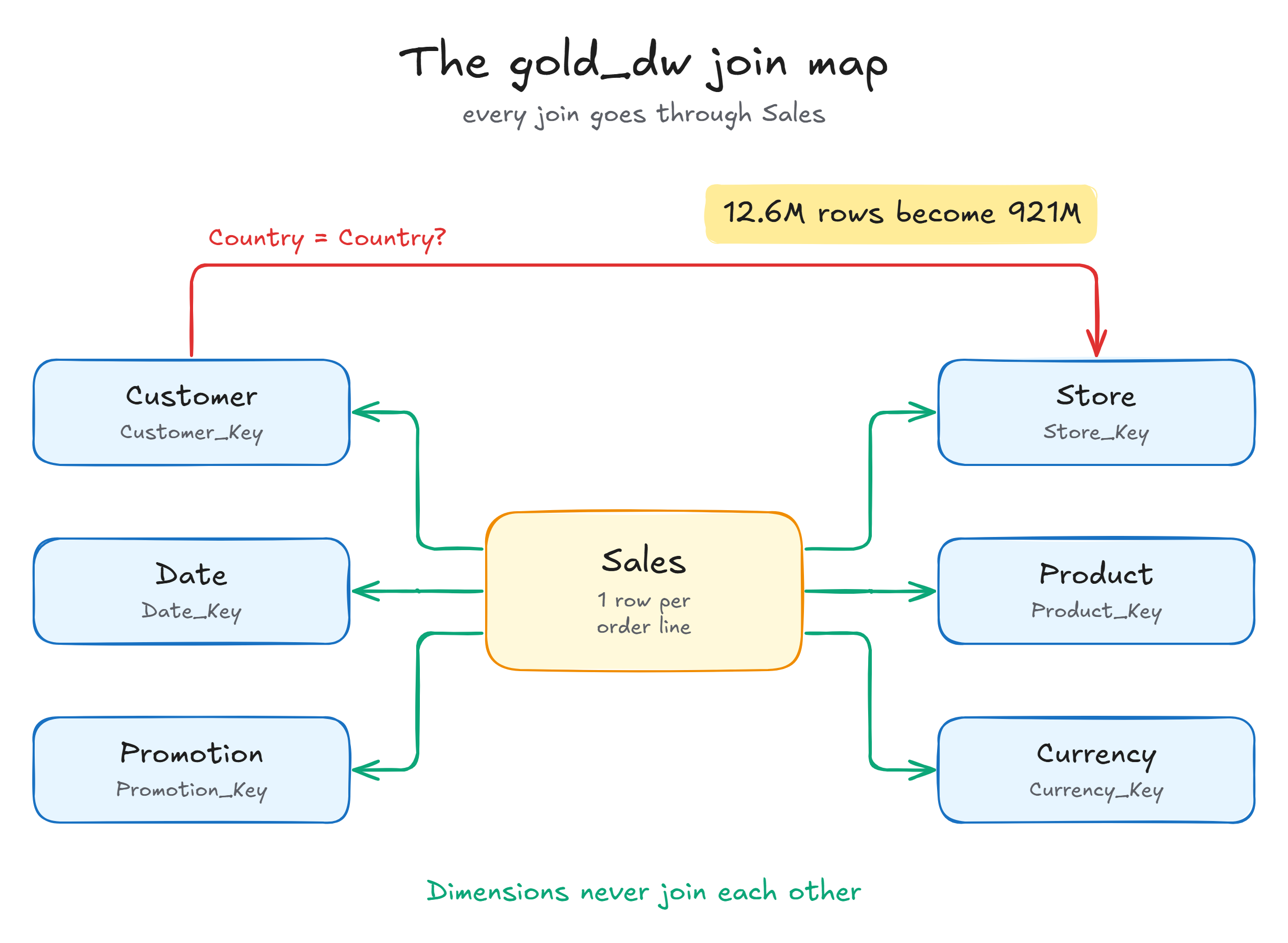
This is the trap I was most worried about. Customer and Store both have [Country], [State], [City] and [Continent]. Same names, same types, so to a model reading the schema they look like keys. They aren't: Customer.[Country] is where a buyer lives, and Store.[Country] is where a store is located. Nothing links a customer to the stores in their country.
I call joining on columns like that a lookalike join: it reads like a real relationship, runs without error, and quietly multiplies rows. Here it is next to a proper key join:
-- Key join: each sale points to exactly one customer
SELECT COUNT_BIG(*) AS order_lines, SUM(s.[Sales Amount]) AS sales_amount
FROM dbo.Sales AS s
JOIN dbo.Customer AS c ON c.Customer_Key = s.Customer_Key;

-- Lookalike join: then on to Store through Country, which is not a key
SELECT COUNT_BIG(*) AS order_lines, SUM(s.[Sales Amount]) AS sales_amount
FROM dbo.Sales AS s
JOIN dbo.Customer AS c ON c.Customer_Key = s.Customer_Key
JOIN dbo.Store AS st ON st.[Country] = c.[Country];
| Join | order_lines | sales_amount |
|---|---|---|
| Key join | 12,629,693 | 2,718,834,661.24 |
| Lookalike join on Country | 920,655,636 | 202,072,346,474.56 |
Germany shows how it happens. There are 12 stores located in Germany, so every order line from a German customer gets paired with all 12 of them: one sale becomes 12 rows. Across every country that's 73 times the rows and 74 times the revenue, a classic fan-out, and there's no error to warn you. Fabric warehouse foreign keys are NOT ENFORCED, so nothing in the schema objects.
What it did: with no instructions, it got it right. It summed sales per customer country and counted stores per store country separately.
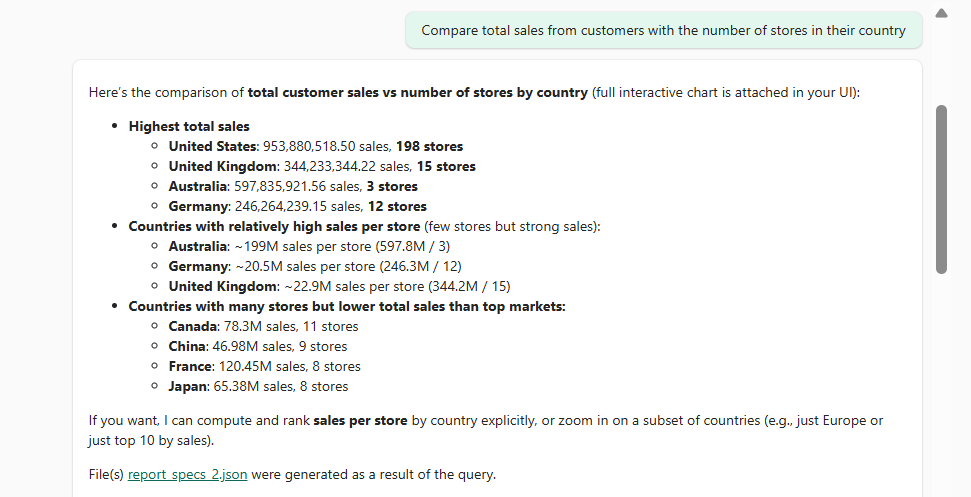
Then I broke it. My first draft said "never join Customer to Store on Country" and "there are three regional online stores". The agent obeyed, found another route through Sales, and counted the stores each country's customers bought from: 3 for the US instead of the 198 located there.
The line that fixed it tells the agent what to do, not just what to avoid:
- Stores in a country: count dbo.Store rows grouped by Store.[Country] (all store types). To compare with
  customer geography, aggregate Sales by Customer.[Country] and Store by Store.[Country] in separate
  subqueries, then match the two results on country.
That's exactly this pattern:
WITH customer_sales AS (
    SELECT c.[Country], SUM(s.[Sales Amount]) AS sales_amount
    FROM dbo.Sales AS s
    JOIN dbo.Customer AS c ON c.Customer_Key = s.Customer_Key
    GROUP BY c.[Country]
),
stores AS (
    SELECT [Country], COUNT(*) AS stores
    FROM dbo.Store
    GROUP BY [Country]
)
SELECT TOP 4 cs.[Country], cs.sales_amount, st.stores
FROM customer_sales AS cs
LEFT JOIN stores AS st ON st.[Country] = cs.[Country]
ORDER BY cs.sales_amount DESC;
| Country | sales_amount | stores |
|---|---|---|
| United States | 953,880,518.50 | 198 |
| Australia | 597,835,921.56 | 3 |
| United Kingdom | 344,233,344.22 | 15 |
| Germany | 246,264,239.15 | 12 |
After: all 29 customer countries with the right store counts.
Question 4: "What were total sales in Germany?"
What it did: 246,264,239.15. Correct, sort of.
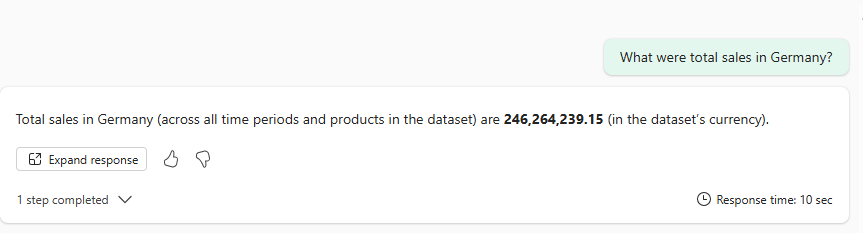
Why "sort of": "Germany" has two honest answers here, depending on which [Country] you mean:
SELECT 'Store country' AS meaning, COUNT_BIG(*) AS order_lines, SUM(s.[Sales Amount]) AS sales_amount
FROM dbo.Sales AS s
JOIN dbo.Store AS st ON st.Store_Key = s.Store_Key
WHERE st.[Country] = 'Germany'
UNION ALL
SELECT 'Customer country', COUNT_BIG(*), SUM(s.[Sales Amount])
FROM dbo.Sales AS s
JOIN dbo.Customer AS c ON c.Customer_Key = s.Customer_Key
WHERE c.[Country] = 'Germany';
| meaning | order_lines | sales_amount |
|---|---|---|
| Store country (the Europe online store) | 3,848,774 | 837,641,062.33 |
| Customer country (buyers living in Germany) | 1,076,162 | 246,264,239.15 |
The agent picked the customer meaning, which happens to be the one I want. But it picked it on its own, and nothing guarantees it picks the same one next time.
The line I added makes the default a decision instead of luck:
- Country, city or continent: use the Customer view (where the buyer lives) unless the user says "store".
After: same number, every time.
Question 5: "How many customers live in germany?"
Note the lowercase "germany". I created gold_dw as a case-insensitive warehouse, so you'd expect case not to matter. Check both levels, though:
SELECT 'Warehouse (gold_dw)' AS level,
       CAST(DATABASEPROPERTYEX(DB_NAME(), 'Collation') AS varchar(100)) AS collation_name
UNION ALL
SELECT 'Column Customer.[Country]', c.collation_name
FROM sys.columns AS c
WHERE c.object_id = OBJECT_ID('dbo.Customer') AND c.name = 'Country';
| level | collation_name |
|---|---|
| Warehouse (gold_dw) | Latin1_General_100_CI_AS_KS_WS_SC_UTF8 |
| Column Customer.[Country] | Latin1_General_100_BIN2_UTF8 |
The views in gold_dw read from silver_wh, which uses Fabric's default case-sensitive collation, and every text column in all seven views inherits it. So the warehouse setting only covers names: dbo.customer and [country] both work. The values are still compared case-sensitively:
| Filter | Rows |
|---|---|
Customer.[Country] = 'Germany' | 1,791 |
Customer.[Country] = 'germany' | 0 |
Customer.[Country] = 'germany' COLLATE Latin1_General_100_CI_AS_KS_WS_SC_UTF8 | 1,791 |
If your gold layer is views over another warehouse, check the column collation, not the warehouse setting.
What it did: 1,791. Correct. It capitalized the value by itself.

So case didn't bite in my test. I kept these lines anyway as cheap insurance, especially for free text like product names:
- Text comparisons are case-sensitive. Use the exact values listed below. For free-text
  matches use LOWER([column]) LIKE '%term%'.
Every line, and the question that earned it
| Question | Without instructions | Line that fixed it |
|---|---|---|
| Camera price | ❌ empty, guessed 'Cameras' | List the exact category values |
| Active products | ❌ empty, guessed 'Active' | List [Status] values and define "active" |
| Customers vs stores | ✅, then ❌ after my first draft | Say how to compare: aggregate each side, then match |
| Sales in Germany | ⚠️ right by luck | Pick the default meaning of country |
| Lowercase germany | ✅ | Insurance: case-sensitive, exact values |
Here's the full set I ended with. The lines above are in it, plus the basics from Part 3's profiling (grain, keys, the -1 Unknown members):
## General knowledge
- gold_dw is a Contoso online-sales star schema: one fact view (dbo.Sales) and six dimension views.
- Many column names contain spaces. Always bracket them: [Sales Amount], [Product Category].
- Text comparisons are case-sensitive. Use the exact values listed below. For free-text
  matches use LOWER([column]) LIKE '%term%'.
- Missing dimension members use key -1 ("Unknown"), not NULL.

## Table descriptions
- dbo.Sales: one row per order line. Count orders with COUNT(DISTINCT [Sales Order Number]), never COUNT(*).
- Join dbo.Sales to each dimension on the key with the same name: Date_Key, Customer_Key, Store_Key,
  Product_Key, Promotion_Key, Currency_Key. All joins are many-to-one from Sales.
- Date_Key is an int (yyyymmdd). Filter and group dates through dbo.[Date] ([Year], [Quarter] like 'Q3',
  [Month Name]); never compare Date_Key to a date. Fiscal year equals calendar year.
- Dimensions never join each other. Never join Customer to Store on [Country], [State], [City] or [Continent].
- Customer.[Customer Type]: 'Person' or 'Company'. Store.[Store Type]: only 'Online' stores have sales.
- Product.[Product Category] values: 'Home Appliances', 'Computers', 'Cameras and camcorders',
  'Cell phones', 'TV and Video', 'Games and Toys', 'Audio', 'Music, Movies and Audio Books'.
- Promotion.[Promotion Type]: 'Seasonal Discount' or 'No Discount'. Ignore [Promotion Category].

## When asked about
- Country, city or continent: use the Customer view (where the buyer lives) unless the user says "store".
- Store or region: use Store.[Store Name]; there are three regional online stores.
- Stores in a country: count dbo.Store rows grouped by Store.[Country] (all store types). To compare with
  customer geography, aggregate Sales by Customer.[Country] and Store by Store.[Country] in separate
  subqueries, then match the two results on country.
- Revenue, cost, price: use dbo.Sales columns only. Never use Product.[Unit Price] or Product.[Unit Cost].
- Product.[Status] is 'On' or NULL (there is no 'Active' value). "Active products" means [Status] = 'On';
  always say that products with NULL status are excluded. Otherwise don't filter on [Status].
With these, the agent got all five questions right.
Test after every change, including what already worked
The middle row of that table is the lesson I'd underline. Question 3 was correct with no instructions and broke because of a "safety" rule I added. If I'd only re-asked the questions that had failed, I'd never have noticed. Re-ask all of them after every change. Part 13 turns this into a proper test set.
Two gaps remain: the agent doesn't mention the excluded NULL-status products, and it doesn't say which "Germany" it used. Both are about wording, a job for agent-level instructions (Part 9).
Trade-offs: say less, but say the dangerous things
Notice what's not in there: no description of all 110 columns. The agent already sees names and types, and single-column meanings belong in schema object descriptions. Every line either names a valid value, makes a decision, or stops a number from going silently wrong. The cost is maintenance: a hardcoded category list needs updating when categories change. Fine for 8 values; I wouldn't do it for 2,500 products.
What's next
Next up: Data Source Instructions II: Business Terms and Measures. "Active products" was our first taste of it. Next time we pin down what "revenue", "margin" and "return rate" mean in gold_dw, so the agent calculates them the same way every time. See you there.
Sources
- Best practices for improving data agent query generation (where each kind of context belongs, join and grain guidance, expected values): https://learn.microsoft.com/fabric/data-science/data-agent-configuration-best-practices
- Data agent configurations (data source instructions template, schema object descriptions, topics): https://learn.microsoft.com/fabric/data-science/data-agent-configurations
- Add a data source to Data Agent (configuration options for SQL sources): https://learn.microsoft.com/fabric/data-science/data-agent-add-datasources
- Data Warehouse collation (default case-sensitive
Latin1_General_100_BIN2_UTF8): https://learn.microsoft.com/fabric/data-warehouse/collation - Primary, foreign, and unique keys in Fabric Warehouse (foreign keys are
NOT ENFORCEDonly): https://learn.microsoft.com/fabric/data-warehouse/table-constraints
0 comments
No comments yet. Be the first to comment!