How to
write a Fabric data agent's data source description so routing works, including
a mistake that stays invisible until you add a second source.
In Part 3 we
profiled gold_wh and came away with a
list of surprises. Now I want you to take that list and turn it into about four
sentences. That's the data source description, and it's the field most people
fill with one lazy line and never look at again.
Which is
fine. Right up until the day you add a second data source and the agent starts
sending questions to the wrong place.
The
field that decides "is this my job?"
When you add
a warehouse to a Fabric data agent, you get a Data Source Description field. Its job is
narrow: when a question comes in, the agent reads this description (along with
the schema it can see) to decide whether this source is the right place to
look.
A few things
worth knowing before you write one:
- Not every source has it. SQL sources (warehouse, lakehouse, SQL database,
mirrored DBs), KQL databases and graph models get the field. Power BI semantic models don't;
they're configured through Prep for AI instead. Keep that in mind if a
semantic model is ever your second source.
- An agent can have up to five sources, in any mix. So "we'll only ever have one"
is a bet, not a plan.
- The description is about routing, not query writing. Table details, joins and business terms go in the data
source instructions (Parts 6 and 7). The description just answers
"should this question come to me at all?"
Here's the
sneaky part. With one data source, a bad description is invisible. There's
nowhere else to route to, so every question lands on your warehouse no matter
what the description says. Add a second source and that safety net is gone. A
vague description starts quietly sending questions to the wrong place, or
worse, to a source that gives a plausible wrong answer instead of no answer.
And this
series builds a single-source agent first, so every description you write will look good enough. So write
it as if the second and third sources already exist. Trust me, it's a lot nicer
than rewriting it under pressure later.
What
a good description actually says
The instinct
is to describe what the source is:
"the sales warehouse". True, and mostly useless. A routing
description earns its keep by saying what the source can answer, and just as
importantly, what it can't.
Here's the
lazy version for our warehouse:
> Sales
data.
And here's
the one for gold_wh, built straight from
the Part 4 findings:
> Contoso
online
retail sales: one row per online order line, from 1 Jan 2024 to 31 Dec 2026,
all amounts in USD. Use it for sales amount, cost, margin, quantity, returns
and discounts, sliced by product (category, subcategory, brand), customer
(type, age and income bands, country), online store region, promotion and date
(including YTD and YoY). Not for physical store, reseller or catalog sales,
other currencies, dates outside 2024 to 2026, inventory or stock levels, sales
targets, marketing spend, or employees.
Every clause
in there is backed by something we queried. Let me show you the receipts,
because this is the bit people usually skip.
"Online"
and "online store region". Part 4 showed that only 3 of 306
stores have any sales. Here's who they are:
SELECT st.[Store Name], st.[Country], COUNT_BIG(*) AS order_lines
FROM dbo.Sales AS s
JOIN dbo.Store AS st ON st.Store_Key = s.Store_Key
GROUP BY st.[Store Name], st.[Country];
Store Name | Country | order_lines |
Contoso North America Online Store | United States | 4,646,993 |
Contoso Asia Online Store | China | 4,133,926 |
Contoso Europe Online Store | Germany | 3,848,774 |
If the
description just said "sales by store", the agent would happily
accept "which of our 299 shops did best?" and answer it with zeros.
"2024
to 2026".
Sales cover three years, even though the calendar runs 2022 to 2028. Stating
the range means a question about 2022 gets a clear "out of scope"
instead of a confident zero.
SELECT d.[Year], COUNT_BIG(*) AS order_lines, SUM(s.[Sales Amount]) AS sales_amount
FROM dbo.Sales AS s
JOIN dbo.[Date] AS d ON d.Date_Key = s.Date_Key
GROUP BY d.[Year]
ORDER BY d.[Year];
Year | order_lines | sales_amount |
2024 | 4,011,407 | 1,013,565,363 |
2025 | 3,617,226 | 847,541,267 |
2026 | 5,001,060 | 857,728,031 |
t's worth checking
the dimension you're advertising actually has spread. Customers here come from
29 countries across 3 continents, so "sales by customer country" is a
real, answerable question, and it goes in.
"USD". One currency across
all 12.6 million rows. Say it, so nobody asks for "sales in euros"
and gets USD numbers with a euro sign slapped on.
See the
pattern? The good description does three jobs the lazy one can't:
- It states the grain (one row per order line), so the agent doesn't assume
a row is an order.
- It states the boundaries (online only, 2024 to 2026, USD), so out-of-range
questions fail loudly instead of quietly.
- It names the neighbours it doesn't cover (inventory, targets, marketing spend, employees).
These are exactly the things someone will reasonably assume a "sales
warehouse" knows about.
Too
narrow is a real failure mode too
Now don't
swing too far the other way. It's easy to over-correct and write something so
tight it turns away questions the warehouse can genuinely answer.
Say your
description reads "sales amount and quantity by product and date".
Sounds fine, right? But Sales
also has [Return
Quantity]
and [Return
Amount]:
SELECT
SUM([Return Amount]) AS return_amount,
SUM(CASE WHEN [Return Quantity] > 0 THEN 1 ELSE 0 END) AS lines_with_returns
FROM dbo.Sales;
return_amount | lines_with_returns |
29,240,824.96 | 100,168 |
That's a
perfectly good answer to "what's our return rate by category?", and a
too-literal description could make the agent wave it off as out of scope. Same
for discounts and promotions.
The fix
isn't listing every possible question. Describe the source at the level of its subject area, grain and boundaries,
and let the schema and the data source instructions fill in the details. The
description answers "is this the right neighbourhood?", not
"does this exact house exist?".
Description
and instructions are two different levers
The
description isn't your only routing tool. The agent-level data agent instructions
(up to 15,000 characters of plain English, covered properly in Part 10) can
steer routing too: "send financial metrics to the semantic model, and
transaction detail to the warehouse".
They work
together, not instead of each other. The description is the source explaining its own scope. Agent
instructions are you, from the outside, settling the argument when two sources
both look plausible. With a single warehouse today you only need the first one.
But writing an honest description now means the second lever has something real
to work with once another source shows up.
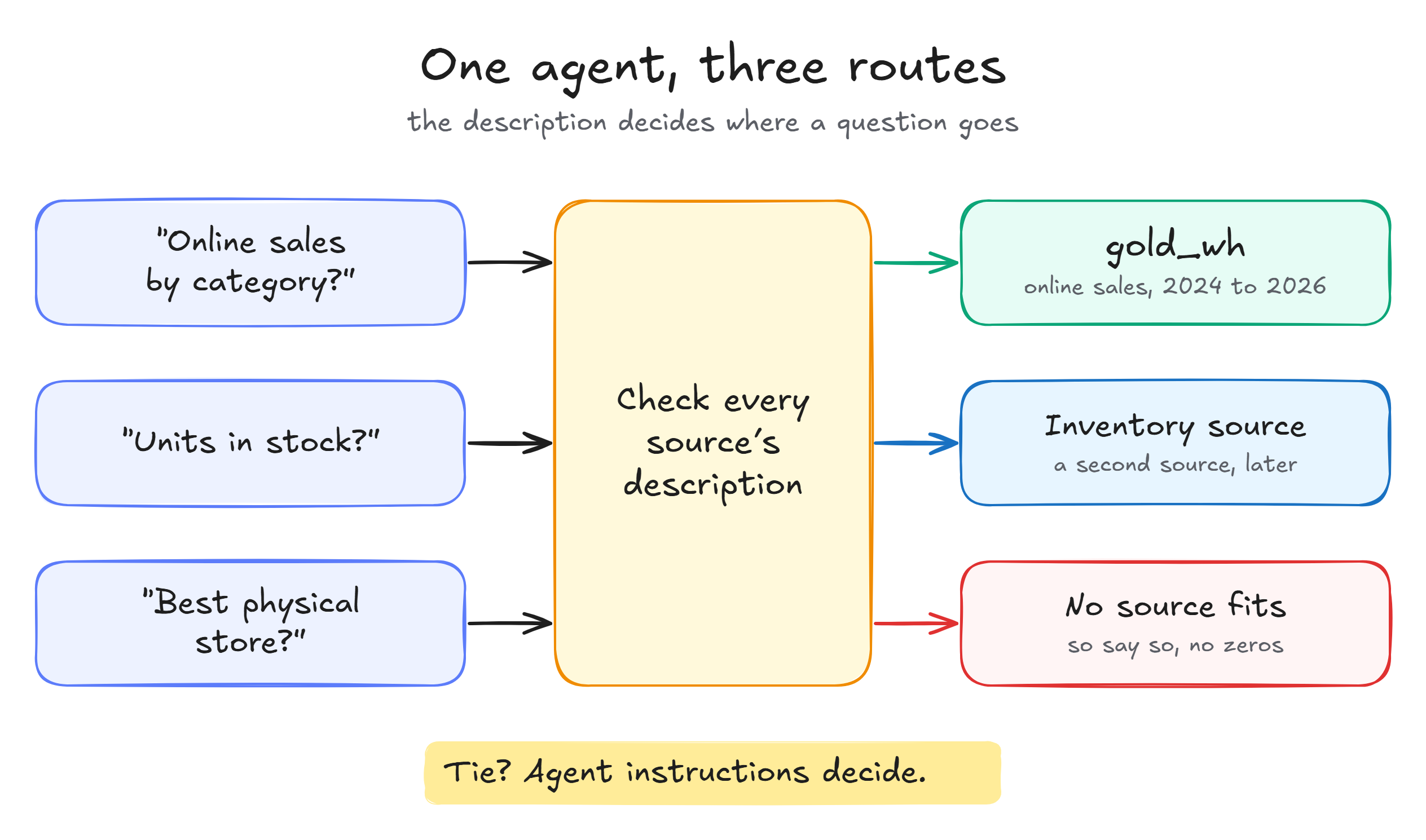
Here's how
the three kinds of questions should play out once there's a second source next
to gold_wh:
The mistake that hides until you add a source
The most
common version of this mistake isn't a badly written description. It's one that
was accurate the day you wrote it and never got updated.
I've got a
real one. The description I wrote for the first version of this agent, on an
older warehouse, says sales can be sliced by "channel (Store, Reseller,
Catalog, Online)". On that warehouse, it was true. On the rebuilt gold_wh, it's flat wrong:
every sale is online. If I'd copied that description across, the agent would
cheerfully accept "compare store sales with online sales" and come
back with a comparison against zero, looking every bit as confident as a
correct answer.
A stale
description doesn't throw an error. It makes a plausible, wrong routing
decision that looks exactly like a right one until someone checks the query. So
treat it like any other doc people rely on: when the warehouse gains or loses a
subject area, a date range or a dimension, the description gets revisited in
the same change.
Test
the boundary, not just the obvious cases
Once you've
written it, don't test it with the questions you already know it handles well.
Go poke the edges on purpose. Here's the little set I use for gold_wh:
Question | What
should happen | Why |
"Online sales by product
category in 2025" | Answered from | Squarely in scope |
"What's our return rate for
cameras?" | Answered from | In scope, just phrased differently
(checks "too narrow") |
"Which physical store sold
the most last year?" | Says the data only covers online
sales | Excluded neighbour |
"Sales in 2022" | Says sales start in 2024 | Outside the range, even though the
calendar has 2022 |
"How many units of product X
are in stock?" | Says it can't answer (or, later,
routes to the inventory source) | Not in this warehouse at all |
[ Image placeholder ] The data agent answering the
boundary questions
Part 14
covers building a proper test set, but you don't need to wait for it. Five
questions by hand, the first time you write the description, takes five
minutes. It catches both the too-broad and too-narrow mistakes while they're
still a one-line edit.
What's
next
Next up in
the series: Data Source
Instructions I: Tables, Joins, and Relationships. Routing's
scoped honestly now, so we'll head inside gold_wh and write the instructions that describe its
views, its grain and which joins actually exist. See you there.
Sources
- Add
a data source to Data Agent (supported sources, Data Source Description
support by source type, up to five data sources): https://learn.microsoft.com/fabric/data-science/data-agent-add-datasources
- Create a Fabric data agent (agent-level instructions, 15,000-character limit, routing examples): https://learn.microsoft.com/fabric/data-science/how-to-create-data-agent
0 comments
No comments yet. Be the first to comment!